
Looking for a responsive Blogger template that combines a clean design with useful blogging features? SEO Edge – Responsive & Faster Blogger Template by Edgy Templates is worth considering if you want to build a professional-looking blog on Google’s Blogger platform.
SEO Edge focuses on responsive design, featured posts, customizable content sections, and tools that make publishing articles easier. It also offers features such as dark mode, a table of contents, custom post shortcodes, and advertisement placements, depending on the version you choose.
But is SEO Edge the right Blogger template for your website? In this review, we’ll look at its key features, customization options, SEO-related capabilities, performance considerations, pricing, and potential limitations.
Quick verdict: SEO Edge is a promising option for bloggers who want more than a basic Blogger theme. Its content-display tools and built-in publishing features may suit technology blogs, tutorials, online resource websites, and content-focused blogs. However, you should test the live demo and confirm which features are included in the free version before installing it.
SEO Edge Blogger Template: Overview
SEO Edge is a Blogger template developed by Edgy Templates. It is designed for bloggers who want a responsive layout with additional tools for displaying articles, organizing content, and monetizing their websites.
One of its notable features is a native-feed-based system for loading featured posts. According to the developer, this approach is intended to reduce unnecessary loading overhead compared with relying on the default Blogger feed for those sections.
The template is available in free and premium editions. The premium edition advertises additional functionality, documentation, updates, and support. The exact benefits depend on the edition and its current license terms.
Template Details
| Template name | SEO Edge – Responsive & Faster Blogger Template |
| Developer | Edgy Templates |
| Price | Free & Paid Version |
| Platform | Blogger / Blogspot |
| Design | Responsive, content-focused blog layout |
Key Features of SEO Edge
1. Responsive Design
A responsive design helps your blog adapt to different screen sizes, including mobile phones, tablets, and desktop computers.
SEO Edge is advertised as a responsive Blogger template. This makes it a potential choice for blogs whose visitors arrive from mobile search results, social media, and desktop browsers.
However, responsive design alone does not guarantee a perfect mobile experience. Before installing the theme, check that:
- Article text is readable without zooming.
- Navigation menus work properly on smaller screens.
- Images and content cards fit within the screen.
- Advertisement placements do not cover content.
- Buttons, links, and the search function remain usable.
Our tip: Test both the homepage and individual article pages on a mobile device. Long articles, tables, and embedded media can behave differently from the homepage.
2. Design and Layout
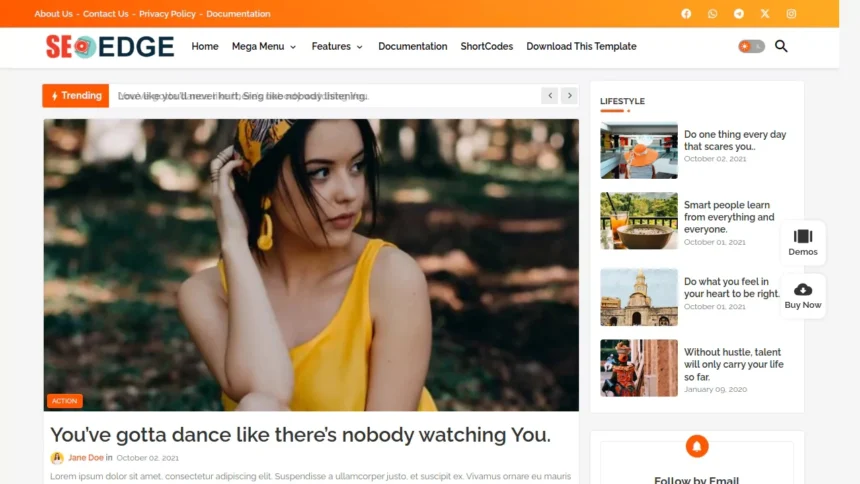
SEO Edge offers a content-focused design with features for displaying posts in different sections. Its featured-post functionality can help readers discover important or recently published articles without navigating through a long archive.
The developer also advertises an AJAX-powered mega menu and customizable post cards, which can help organize a growing blog.
This layout may work well for:
- Technology and software blogs
- Blogging and SEO tutorial websites
- Educational and resource websites
- Download and information blogs
- General-interest and magazine-style blogs
If you publish long-form tutorials, reviews, or resource lists, consider whether the homepage gives your most useful articles enough visibility. A busy homepage with too many content sections can make navigation harder, even when the design looks attractive.
3. SEO-Friendly Structure
SEO Edge is marketed as an SEO-oriented Blogger template. The developer advertises SEO optimizations and advanced Schema.org-related functionality for the premium offering.
These features may help provide a suitable technical foundation, but the actual implementation should be checked on the live site.
When evaluating SEO Edge, look for:
- Appropriate page titles and meta descriptions
- A logical heading hierarchy
- Correct canonical URLs
- Mobile-friendly layouts
- Valid structured data where relevant
- Crawlable navigation and internal links
- Proper handling of images and article URLs
Structured data can help search engines understand a page, but adding schema does not guarantee rich results or higher rankings. Similarly, a theme’s SEO claims should not replace checking the rendered HTML and testing your own website.
Important: SEO Edge cannot guarantee first-page rankings. Your content quality, search intent coverage, internal linking, indexing, site performance, and overall SEO strategy still matter.
4. Loading Speed and Performance
Speed is one of the main selling points of SEO Edge. The developer describes it as a fast-loading template and explains that its native feed system is designed to improve the loading of featured-post sections.
This is a useful design consideration, but it is not enough to conclude that every website using the template will be fast.
Actual performance depends on several factors, including:
- The template version you install
- Image dimensions and file sizes
- External scripts and fonts
- Advertisement and analytics code
- The number of homepage sections and widgets
- The amount of JavaScript running on the page
We have not independently verified current PageSpeed Insights scores for SEO Edge in this review, so no specific performance score is claimed.
You can test the official demo or your own installation using Google PageSpeed Insights:
Test SEO Edge with Google PageSpeed Insights
For a useful comparison, record the date, mobile or desktop category, performance score, Largest Contentful Paint (LCP), Interaction to Next Paint (INP), and Cumulative Layout Shift (CLS). Run the test more than once if results vary.
For your own blog, mobile performance deserves particular attention. A theme can look lightweight while third-party widgets, large images, or advertisements slow down the finished website.
5. Customization Options
SEO Edge includes features intended to simplify customization and article publishing.
Depending on the version and available settings, you may be able to configure layout sections, featured posts, menus, content cards, and other template elements through Blogger’s layout interface and the theme’s supported options.
The developer also advertises custom shortcodes that help users add predefined content elements to posts and pages.
Keep in mind that not every design change is necessarily available through a visual setting. Advanced changes to spacing, colours, typography, or the layout may require editing the Blogger XML template or CSS.
If you’re a beginner, review the documentation before making substantial changes. Always keep a backup of your working theme.
6. Additional Features
SEO Edge advertises several additional features that can be useful for content publishers.
| Feature | Why it may be useful |
| Featured-post sections | Highlight important articles on the homepage |
| AJAX-powered mega menu | Organize navigation for blogs with many categories |
| Custom post cards and shortcodes | Present information in reusable layouts |
| Table of contents | Help readers navigate long articles |
| Dark mode | Offer an alternative viewing appearance |
| Advertisement placements | Provide options for displaying advertisements |
| Custom in-post ad code | Support more flexible ad placement |
| Subscription form | Provide a way to promote newsletter subscriptions |
| Related or sidebar post sections | Help readers discover additional content |
| Content pagination | Split supported long-form content into multiple pages |
| Multiple comment options | The developer lists Facebook and Disqus comment support |
| Cookie consent | The developer advertises a native cookie-consent feature |
Feature availability may vary by edition. Check the official feature list and documentation before relying on any particular feature.
Pros
- Free version available: You can explore the template without immediately paying for a premium licence.
- Useful content-display features: Featured posts, custom cards, and shortcodes can make article discovery easier.
- Responsive design: The developer advertises layouts designed for different screen sizes.
- Built-in publishing tools: Features such as a table of contents and content pagination can help with longer articles.
- Premium support and updates: The developer advertises ongoing updates and premium support, subject to the applicable licence.
Cons
- Some features may require payment: The free edition does not necessarily include every premium feature.
- Performance still needs testing: A fast-template claim does not guarantee strong Core Web Vitals on every installation.
- Advanced customization may require code: Not every design adjustment can be assumed to be available in the Blogger layout editor.
- Extra features can add complexity: Menus, widgets, advertisements, and other scripts should be configured carefully to avoid unnecessary page weight.
- Licence terms need checking: Confirm permitted usage, attribution requirements, support coverage, and update eligibility before choosing an edition.
SEO Edge Demo and Download
Want to see how SEO Edge looks before installing it? Start with the developer’s official resources.
- Live demo: Preview SEO Edge
- Official template page: SEO Edge – Edgy Templates
- Free download and licence information: Available through the official template page, subject to the developer’s terms.
The developer’s product page lists a free version alongside a premium licence. The premium offer and current pricing can change, so check the official page for the latest details.
Before downloading, review the licensing terms, installation guide, change log, and documentation. Avoid unofficial downloads that may contain modified template code or unwanted scripts.
How to Install SEO Edge on Blogger
Installing a third-party Blogger theme is relatively straightforward, but backing up your current design is important.
- Sign in to your Blogger dashboard.
- Select the blog where you want to install SEO Edge.
- Open Theme from the sidebar.
- Back up your existing theme before making changes.
- Download the SEO Edge theme package from the official source and extract it if necessary.
- Locate the Blogger XML theme file.
- Use Blogger’s available restore or upload option to install the theme. Follow the developer’s instructions if the interface or package differs.
- Preview the blog and inspect the homepage, article pages, menus, sidebar, footer, and mobile layout.
- Configure the available widgets and customization options.
- Test internal links, images, advertisements, and any third-party scripts before making the theme your permanent design.
Installation tip: Test the theme on a spare blog first if your main website is already receiving visitors. Some templates use custom widgets or post shortcodes that may need additional setup.
Is SEO Edge Good for SEO?
SEO Edge may be a reasonable option if you want a Blogger theme with a responsive layout and built-in tools for organizing content. Its SEO-oriented features and advertised structured-data support are worth investigating.
However, choosing an SEO-friendly theme is only one part of building a search-friendly website.
For the best results, focus on the following areas:
- Helpful content: Write original articles that answer readers’ questions clearly.
- Search intent: Make sure each page satisfies the reason someone searched for the topic.
- On-page SEO: Use descriptive titles, useful headings, and relevant internal links.
- Image optimization: Compress images and use descriptive alternative text when appropriate.
- Technical SEO: Check canonical URLs, indexing, robots directives, and structured data.
- Performance: Monitor mobile speed and Core Web Vitals on the actual website.
- User experience: Keep navigation simple and avoid intrusive advertisements.
Use Google’s Rich Results Test to check eligible structured data and PageSpeed Insights to evaluate performance.
Do not assume that every advertised SEO feature works perfectly in every version. Validate the rendered pages after installation, especially if you use custom widgets or modify the theme.
Who Should Use SEO Edge?
SEO Edge may be suitable for:
- New bloggers: People who want a more feature-rich design than a basic Blogger theme.
- Tutorial and technology publishers: Blogs that benefit from featured articles, content cards, and structured navigation.
- Resource websites: Publishers who organize downloads, guides, and informational articles.
- Content marketers: Bloggers who want options for displaying advertisements and encouraging subscriptions.
- Experienced Blogger users: People comfortable configuring widgets and making occasional HTML or CSS changes.
It may be less suitable for someone who wants an extremely minimal theme with very few built-in features, or for a website that requires advanced functionality only available through a different platform.
If your priority is the simplest possible setup, compare the free edition with other lightweight Blogger templates before committing to the premium version.
Final Verdict: Should You Use SEO Edge?
SEO Edge is worth considering if you want a feature-rich Blogger template that goes beyond a simple blog layout. Its responsive design, featured-post sections, table of contents, custom shortcodes, and advertising options may be particularly useful for tutorial websites, technology blogs, and resource-focused publishers.
Its biggest consideration is complexity: you should confirm which features are included in your chosen edition and test the actual website’s performance rather than relying only on marketing claims.
Our recommendation: Start with the free version if its licence and available features meet your needs. Preview the demo, test mobile usability, and run PageSpeed Insights before moving the theme to your main blog. Consider the premium edition only if its additional functionality and support provide clear value for your website.
Have you tried the SEO Edge Blogger Template? Share your experience, questions, or suggestions in the comments below.
Frequently Asked Questions
Is SEO Edge free?
Yes, the developer lists a free version of SEO Edge. A premium edition is also available with additional advertised features and benefits. Review the official licence information to understand the differences before downloading.
Is SEO Edge mobile-friendly?
SEO Edge is advertised as responsive and mobile-friendly. However, test the demo or your own installation on different screen sizes to confirm that menus, text, images, and advertisements work as expected.
Is SEO Edge SEO-friendly?
The developer markets SEO Edge as an SEO-oriented template and advertises advanced structured-data features for its premium offering. Its actual SEO quality depends on the implementation, configuration, and content of your website. No Blogger theme can guarantee better Google rankings.
Can beginners customize SEO Edge?
Beginners can start with the available Blogger layout settings and the template’s documented options. Some advanced adjustments may require HTML or CSS knowledge. Following the installation documentation can help avoid common configuration problems.
Where can I download SEO Edge?
Visit the official SEO Edge template page. Check the free edition’s licence and download instructions there.
Does SEO Edge support Google AdSense?
The developer advertises advertisement placements and describes its Blogger themes as AdSense-friendly. However, this does not guarantee AdSense approval or earnings. Check the current documentation, configure placements carefully, and follow Google’s publisher policies.
Does SEO Edge include dark mode?
Yes, dark mode is listed among the template’s advertised features. Confirm its availability in your chosen edition and test how it affects your logo, images, text, and other design elements.
Is SEO Edge worth buying?
It may be worth considering if you need its premium content cards, publishing tools, customization options, and support. If you only need a basic blog layout, try the free edition first and upgrade only if the additional features justify the cost.